Add PLMN to Steering Tree
Adding a PLMN to a steering tree involves selecting a network identifier or country and operator, choosing the desired network type (4G or 2.5-3G), and then assigning a specific PLMN. This process helps you configure the device to prioritize connecting to a preferred mobile network based on specified criteria.
A screen capture of the Add PLMN row to the steering tree table is shown here.
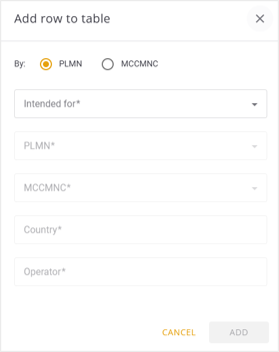
To add a PLMN to steering tree, do these steps.
- Select Providers | Steering Management from the sidebar.
- Select a Steering Tree in the left panel to display the Steering Tree details.
- Click the + icon on the right side of the steering tree details panel. The Add Row to Table is displayed.
- Select one of these options:
- PLMN
- MCCMNC
-
Select the type of network from the Intended for options:
- 4G
- 2.5/3G
- Select a PLMN identifier from the list.
- Select an MCCMNC identifier from the list.
- Repeat Steps 3-10 to add additional PLMNs to the steering tree.
NOTE: The Country and Operator fields are automatically selected.